
Introduction
Have you ever wondered how smart devices work? Like automatic lights, temperature sensors, or even robots? The answer often starts with something simple yet powerful — Arduino.
If you’re new to electronics or programming, hearing the word “Arduino” might feel a bit technical. But here’s the thing… it’s actually one of the easiest ways to get started with building real-world tech projects.
In this guide, we’ll understand what Arduino is in a simple way, how it works, and where it’s used in real life. You’ll also see a basic code example so you can get a practical feel of it.
Let’s understand this step by step — no complicated jargon, just clear explanation.
Table of Contents
- What is Arduino?
- How Arduino Works
- Components of Arduino
- Real-Life Examples of Arduino
- Simple Arduino Code Example
- Arduino vs Other Platforms
- Conclusion
- FAQs
What is Arduino? (Simple Explanation)
Arduino is an open-source electronics platform used to build digital devices and interactive projects.
In simple words, Arduino is like a small computer (microcontroller) that you can program to control things like lights, motors, sensors, and more.
Most beginners make this mistake — they think Arduino is just hardware. But actually, it has two parts:
- Hardware → The physical board (like Arduino Uno)
- Software → The Arduino IDE where you write code
Together, they allow you to create amazing projects, even if you have zero experience.
How Arduino Works (Step-by-Step)
Let’s break it down in a very simple way.
Arduino follows a basic cycle:
- Input → Takes data from sensors (button, temperature sensor, etc.)
- Process → Runs your code
- Output → Controls devices (LED, motor, buzzer)
Here’s the flow:
👉 Sensor → Arduino → Action
For example:
- You press a button → Arduino reads it → LED turns ON
In real projects, this matters a lot because everything depends on how well your logic works.
Main Components of Arduino
To understand Arduino better, let’s look at its main parts.
1. Arduino Board
This is the main hardware (like Arduino Uno). It contains a microcontroller that executes your code.
2. Microcontroller
It’s the brain of Arduino. It processes instructions and controls everything.
3. Input Devices
These send data to Arduino:
- Buttons
- Sensors (temperature, motion, light)
4. Output Devices
These receive commands from Arduino:
- LEDs
- Motors
- Buzzers
5. Arduino IDE (Software)
This is where you write and upload code to the board.
Real-Life Examples of Arduino
Now let’s make things interesting. Where is Arduino actually used?
1. Automatic Street Lights
Street lights that turn ON at night and OFF during the day use light sensors with Arduino.
2. Smart Home Systems
Arduino can control:
- Lights
- Fans
- Security systems
3. Temperature Monitoring
Used in weather stations and industrial systems.
4. Robots
From simple obstacle-avoiding robots to advanced AI bots.
5. Agriculture Projects
Farmers use Arduino for:
- Smart irrigation systems
- Soil moisture detection
Here’s the thing — Arduino is not just for students. It’s used in real industries too.
Simple Arduino Code Example (LED Blink)
Let’s look at a basic example to understand how coding works in Arduino.
// Arduino LED Blink Example
void setup() {
  pinMode(13, OUTPUT);
}void loop() {
  digitalWrite(13, HIGH);
  delay(1000);
  digitalWrite(13, LOW);
  delay(1000);
}
What this code does:
- Turns an LED ON for 1 second
- Then turns it OFF for 1 second
- Repeats continuously
How it works:
setup()runs once (initial setup)loop()runs again and again
Most beginners make this mistake — they don’t understand the difference between setup() and loop(). Always remember:
👉 setup = one-time
👉 loop = continuous
Arduino vs Other Platforms
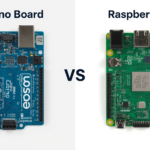
Let’s compare Arduino with another popular platform.
| Feature | Arduino | Raspberry Pi |
|---|---|---|
| Type | Microcontroller | Mini Computer |
| Use | Hardware control | Full OS applications |
| Programming | Simple (C/C++) | Advanced (Python, Linux) |
| Best For | Beginners & electronics | Advanced computing |
If you’re just starting, Arduino is the better choice.
Images (Suggestions)
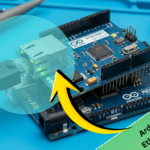
- [Image: Arduino Uno board labeled diagram]
Alt text: Arduino Uno components explained - [Image: Basic LED circuit with Arduino]
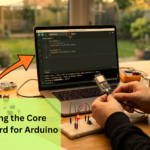
Alt text: Arduino LED connection example - [Image: Arduino project setup with sensors]
Alt text: Arduino real project wiring setup
Internal Linking (Suggestions)
- Beginner Arduino Projects (Step-by-Step)
- How to Set Up Arduino IDE for Beginners
External Linking (Suggestions)
- Arduino Official Website (arduino.cc)
- Electronics Tutorials (electronics-tutorials.ws)
Conclusion
So, what is Arduino? It’s simply a powerful yet beginner-friendly platform that lets you turn ideas into real working projects.
You don’t need to be an expert to start. Just basic curiosity and practice are enough.
Start with small projects like LED blinking, then slowly move to sensors and automation. That’s how most people learn — step by step.
And honestly, once you build your first project, you’ll realize how fun and addictive this can be.
FAQs
1. Is Arduino good for beginners?
Yes, Arduino is one of the easiest platforms for beginners to learn electronics and programming.
2. Do I need coding knowledge for Arduino?
Basic coding helps, but you can start learning alongside Arduino easily.
3. What language does Arduino use?
Arduino uses a simplified version of C/C++.
4. Can I build real projects with Arduino?
Absolutely. From home automation to robotics, Arduino is widely used.
5. How much does an Arduino cost?
It’s affordable. Basic boards like Arduino Uno are budget-friendly for beginners.




Leave a Reply