Starting with electronics or programming can feel overwhelming, especially when you keep hearing about Arduino vs Raspberry Pi everywhere. One tutorial recommends Arduino for beginners, while another says Raspberry Pi is more powerful and future-proof. So which one should you actually choose?
Here’s the thing both are amazing learning platforms, but they solve different problems.
Some people buy a Raspberry Pi expecting it to work like a simple microcontroller. Others get an Arduino and later realize it cannot run apps, browsers, or operating systems. Most beginners make this mistake because they compare them without understanding what each device is built for.
This guide will help you understand the real difference between Arduino and Raspberry Pi in simple language. You’ll learn how they work, what projects they are best for, which one is easier for beginners, and how to choose the right platform for your goals.
Let’s understand this step by step.
Table of Contents
- What is Arduino?
- What is Raspberry Pi?
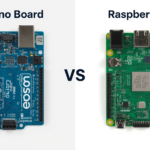
- Arduino vs Raspberry Pi: Key Differences
- Which is Easier for Beginners?
- Best Projects for Each Platform
- Can Arduino and Raspberry Pi Work Together?
- Which One Should You Buy First?
- Conclusion
- FAQs
What is Arduino?
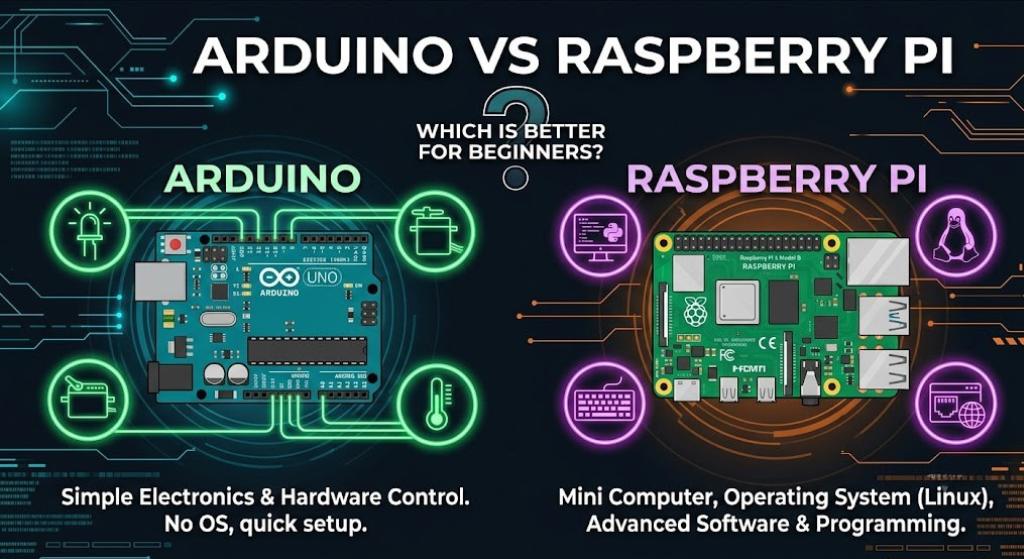
Arduino is a microcontroller-based development board designed mainly for electronics and hardware projects.
It helps you interact with components like:
- LEDs
- Sensors
- Motors
- Relays
- Buzzers
The most popular version is the Arduino Uno, and it’s usually the first board beginners learn with.
Unlike a normal computer, Arduino does not run a full operating system. You simply upload code to the board, and it performs that task repeatedly.
That simplicity is exactly why so many beginners love it.
Why Arduino Feels Beginner-Friendly
When you start learning electronics, immediate results are motivating.
For example, within 10 minutes you can:
- Blink an LED
- Read temperature data
- Move a servo motor
- Build a mini robot
You write a small amount of code, upload it, and instantly see something happen physically.
In real projects, this matters a lot because hands-on learning improves understanding much faster than theory alone.
What is Raspberry Pi?
Raspberry Pi is different.
It’s actually a tiny single-board computer that can run a complete operating system like Linux.
You can connect:
- A monitor
- Keyboard
- Mouse
- Wi-Fi
- USB devices
And use it almost like a desktop computer.
That means Raspberry Pi can do much more advanced tasks compared to Arduino.
Common Uses of Raspberry Pi
People use Raspberry Pi for:
- Python programming
- AI and machine learning
- Smart home systems
- Web servers
- Media centers
- Computer vision projects
Here’s the interesting part — Raspberry Pi focuses more on software and computing power, while Arduino focuses on hardware control.
Arduino vs Raspberry Pi: Key Differences
Now let’s compare them side by side.
Quick Comparison Table
| Feature | Arduino | Raspberry Pi |
|---|---|---|
| Device Type | Microcontroller | Mini Computer |
| Operating System | No | Yes |
| Programming Languages | Mainly C/C++ | Python, C++, Java & more |
| Startup Time | Instant | Takes time to boot |
| Best For | Electronics Projects | Advanced Computing Projects |
| Power Consumption | Very Low | Higher |
| Internet Support | Limited | Built-in Wi-Fi/Ethernet |
| Beginner Difficulty | Easier | Moderate |
Most beginners understand the difference much better after seeing this table.
Arduino vs Raspberry Pi for Programming
Programming style is another major difference.
Arduino uses simple embedded programming, while Raspberry Pi supports full software development.
Arduino Example Code
Here’s the classic LED blink program beginners usually start with:
// Arduino LED Blink Example

void setup() {
  pinMode(13, OUTPUT);
}

void loop() {
  digitalWrite(13, HIGH);
  delay(1000);

  digitalWrite(13, LOW);
  delay(1000);
}
This code turns an LED ON and OFF every second.
It may look tiny, but it teaches important concepts:
- Digital output
- Loops
- Timing
- Hardware control
Most beginners make this mistake: they forget to select the correct Arduino board or COM port before uploading code.
If uploading fails, check:
- USB cable
- COM port
- Board settings inside Arduino IDE
That fixes the issue most of the time.
Raspberry Pi Example Code
Raspberry Pi often uses Python for GPIO projects.
import RPi.GPIO as GPIO
import time

GPIO.setmode(GPIO.BCM)
GPIO.setup(18, GPIO.OUT)

while True:
    GPIO.output(18, True)
    time.sleep(1)

    GPIO.output(18, False)
    time.sleep(1)
This script blinks an LED connected to GPIO pin 18.
The logic is similar to Arduino, but Raspberry Pi runs Python through a Linux operating system.
That gives more flexibility, but also adds more complexity.
Which is Easier for Beginners?
If you are completely new to electronics, Arduino is usually easier.
Why?
Because there are fewer things to manage.
With Arduino, you don’t need to:
- Install an operating system
- Learn Linux commands
- Manage drivers constantly
- Handle software updates
You simply connect the board, upload code, and start experimenting.
When Raspberry Pi Feels Difficult
Beginners sometimes struggle with Raspberry Pi because it behaves like a small computer.
You may need to:
- Configure Wi-Fi
- Install software packages
- Use terminal commands
- Troubleshoot boot issues
That’s not impossible to learn — it just takes more patience.
Best Projects for Arduino and Raspberry Pi
Choosing the right board becomes easier when you look at real examples.
Best Arduino Projects
- Line follower robot
- Obstacle avoiding robot
- Automatic plant watering system
- Bluetooth-controlled car
- Home security alarm
Arduino is excellent for sensor-based and hardware-heavy projects.
Best Raspberry Pi Projects
- Smart mirror
- AI face detection
- Home automation dashboard
- Personal cloud server
- Retro gaming console
Raspberry Pi shines in projects requiring processing power and internet connectivity.
Can Arduino and Raspberry Pi Work Together?
Yes — and many advanced projects actually combine both.
For example:
- Raspberry Pi handles AI, internet, and cameras
- Arduino controls motors and sensors
This setup is common in robotics and smart automation systems.
In real projects, this matters a lot because dividing tasks improves overall performance and reliability.
Which One Should You Buy First?
Here’s a simple recommendation.
Choose Arduino If You Want To:
- Learn electronics basics
- Build robots
- Work with sensors
- Understand embedded systems
- Start with simple projects
Choose Raspberry Pi If You Want To:
- Learn Python programming
- Build AI projects
- Create servers or web apps
- Work on advanced automation
- Explore Linux systems
Simple Beginner Recommendation
| Your Goal | Best Choice |
|---|---|
| Learn Electronics | Arduino |
| Learn Programming | Raspberry Pi |
| Build Robots | Arduino |
| AI Projects | Raspberry Pi |
| Easier First Experience | Arduino |
Honestly, many people eventually end up learning both.
Conclusion
Choosing between Arduino vs Raspberry Pi becomes much easier once you understand their purpose.
Arduino is simpler, faster to learn, and perfect for electronics beginners. You can start building small projects immediately without worrying about operating systems or complicated setup steps.
Raspberry Pi is more powerful and flexible, but it also introduces extra complexity. It’s excellent for programming, AI, networking, and advanced automation projects.
A smart learning path for many beginners looks like this:
- Start with Arduino
- Learn sensors and hardware basics
- Move to Raspberry Pi later for advanced projects
That combination gives you strong practical skills for robotics, IoT, and modern tech projects.
And honestly, once you start experimenting, you’ll probably find reasons to use both platforms together.
FAQs
Is Arduino better than Raspberry Pi for beginners?
For learning electronics and simple hardware projects, Arduino is usually easier for beginners.
Can Raspberry Pi replace Arduino?
Not completely. Raspberry Pi is powerful, but Arduino handles real-time hardware control more efficiently.
Which is cheaper, Arduino or Raspberry Pi?
Arduino boards are generally cheaper and require fewer accessories.
Do I need programming knowledge before learning Arduino?
No. Many beginners start Arduino with zero coding experience.
Can I use Arduino and Raspberry Pi together?
Yes, many advanced robotics and IoT projects combine both devices.


Leave a Reply