
Are you trying to figure out how to create a base64 encoded string in arduino json so you can safely transmit binary data, images, or sensor payloads over a lightweight HTTP POST request? It is a common challenge because Arduino’s constrained memory architecture makes handling raw binary arrays inside a JSON document highly prone to memory leaks and crashes if not managed carefully.
Below is the absolute fastest and most efficient way to convert your raw data into a Base64 string and serialize it directly into an ArduinoJson document without running out of RAM.
The Direct Solution: Encoding and Packing into ArduinoJson
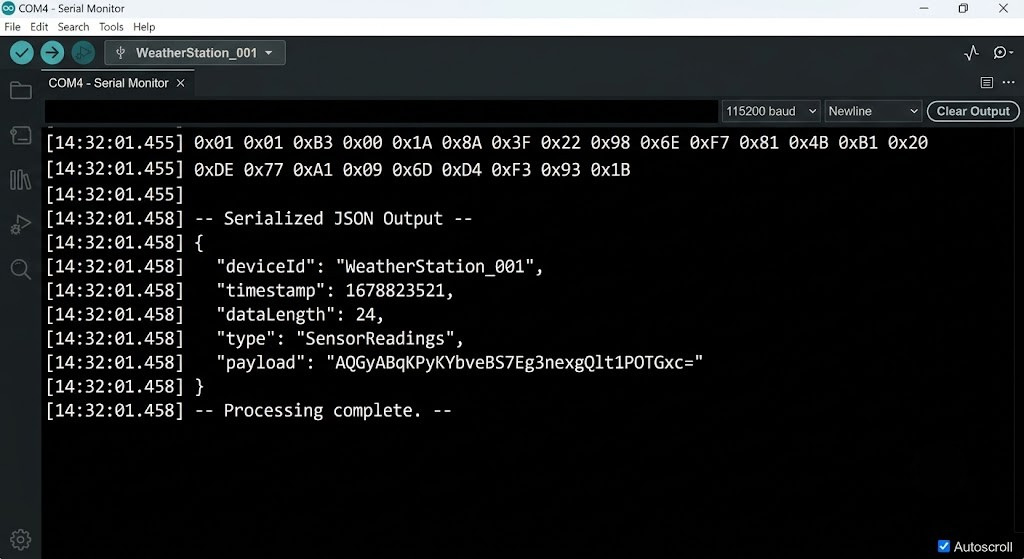
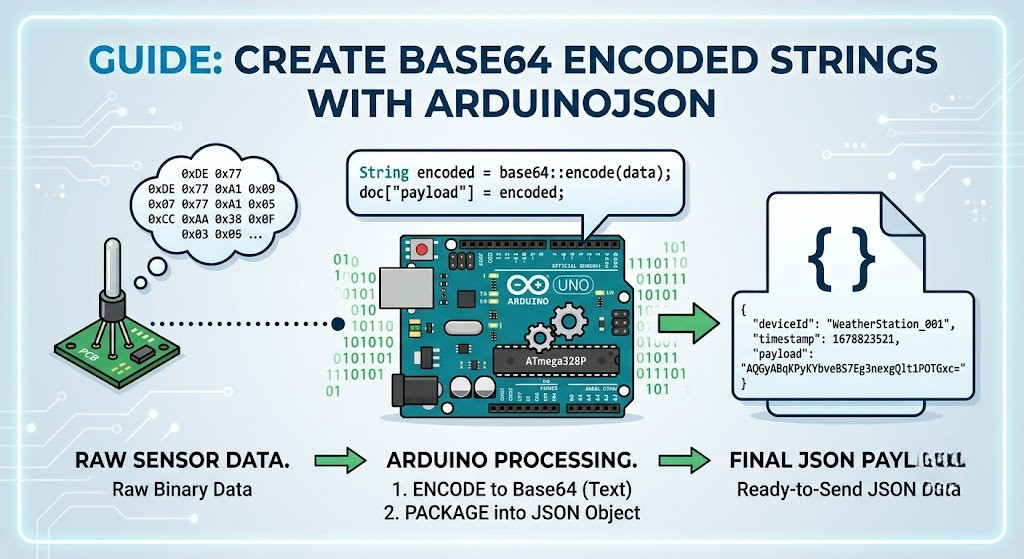
To learn how to create a base64 encoded string in arduino json, you must first convert your raw binary array into a standard Base64 string using a library like rBase64 or the built-in ESP32/ESP8266 base64 library, and then assign that encoded string as a value to your JsonDocument key. Because Base64 contains only safe ASCII characters, ArduinoJson can serialize it seamlessly.
C++
#include <ArduinoJson.h>
#include <rBase64.h> // Common lightweight cross-platform base64 library

void setup() {
  Serial.begin(115200);

  // Your raw binary or string data
  char rawData[] = "SensorData:12345";
  uint16_t dataLength = sizeof(rawData) - 1;

  // 1. Calculate and encode to Base64
  rbase64.encode(rawData, dataLength);
  String base64Encoded = rbase64.get();

  // 2. Create the JSON Document
  JsonDocument doc;
  doc["sensor_id"] = "ESP32_Node1";
  doc["payload_b64"] = base64Encoded; // Store the Base64 string

  // 3. Serialize to Serial
  serializeJson(doc, Serial);
}

void loop() {}
How to Create a Base64 Encoded String in Arduino JSON Step-by-Step Guide to Base64 Encoding for ArduinoJson
When working with microcontrollers like the Arduino Uno, ESP8266, or ESP32, you cannot just drag and drop standard desktop code. Let’s walk through how to build a production-grade implementation.
1. Choose the Right Base64 Library
Different microcontrollers have different built-in options.
- ESP32 & ESP8266: They have a built-in
base64.hutility in their core. - Standard Arduino (Uno, Nano, Mega): Use a lightweight, proven third-party library like
rBase64orbase64_encodeby dojyorin, which is highly compatible across all architectures.
2. Calculate Your Buffer Sizes
Base64 encoding increases your data size by approximately 33%. If you are sending a 3KB binary image, your encoded string will occupy roughly 4KB of RAM.
Critical Memory Trap: Always compute your JSON document capacity with this overhead in mind. If you are using an older version of ArduinoJson (like v6) that uses
StaticJsonDocument, underestimating this size will immediately result in silent write failures or garbage data.
3. ESP32 Specific Implementation
If you are running an ESP32, you can skip third-party libraries entirely by using the static core methods.
C++
#include <ArduinoJson.h>
#include <base64.h>

void sendJsonData() {
  uint8_t rawPayload[] = {0xDE, 0xAD, 0xBE, 0xEF, 0x01, 0x02};
  size_t payloadSize = sizeof(rawPayload);

  // ESP32 Native Core encoding
  String base64Str = base64::encode(rawPayload, payloadSize);

  // Assign directly to ArduinoJson
  JsonDocument doc;
  doc["device"] = "ESP32_Gate";
  doc["data"] = base64Str;

  // Optional: Place an [internal link placeholder] here to link to your WiFi sending helper
  serializeJson(doc, Serial);
}
Common Mistakes to Avoid
- Forgeting the Null Terminator: When encoding raw
chararrays, ensure you pass the correct length parameter. Passingsizeof(array)instead ofstrlen(array)can occasionally bake the null terminator into your Base64 string, generating unexpected trailing padding characters (=). - Stack Overflow from Dynamic Allocations: On low-RAM chips like the ATmega328P, avoid creating massive local String variables. Use fixed-size global buffers if you are calling your encoding function repeatedly within the
loop().
Frequently Asked Questions
Can ArduinoJson encode Base64 natively?
No. ArduinoJson is strictly a JSON parser and serializer. It does not contain cryptographic or utility functions like Base64 encoding or decoding. You must encode the binary data into a standard ASCII string first using a secondary library before assigning it to a JSON key.
Why is my Base64 string cut off in my JSON output?
This usually happens because your JsonDocument size is too small. In newer versions of ArduinoJson (v7+), the memory allocator grows dynamically, but it can still fail if your heap is fragmented. On older v6 versions, you must manually increase the capacity of your DynamicJsonDocument to accommodate the 33% size expansion of the Base64 string.
Does Base64 encoding slow down my Arduino project?
On 32-bit microcontrollers like the ESP32 running at 240MHz, the overhead is negligible. However, on 8-bit AVR chips running at 16MHz (like the Arduino Uno), encoding large payloads (such as JPEG camera frames) will cause noticeable blocking delays in your execution thread.
Wrapping Up
Today we discuss how to create a base64 encoded string in arduino json Encoding binary arrays into Base64 strings is the cleanest way to bypass JSON’s strict text-only formatting limitations. By pairing a reliable helper library with a properly sized ArduinoJson document, you can transmit any sensor or binary payload smoothly to your backend web server or IoT hub.
Disclaimer: The code examples provided are designed for standard hobbyist microcontrollers and may require additional security, memory sanitization, and optimization steps when deployed in production-grade industrial IoT systems.






Leave a Reply